
AI assistance, opt-in
Photograph an asset. Confirm the details.
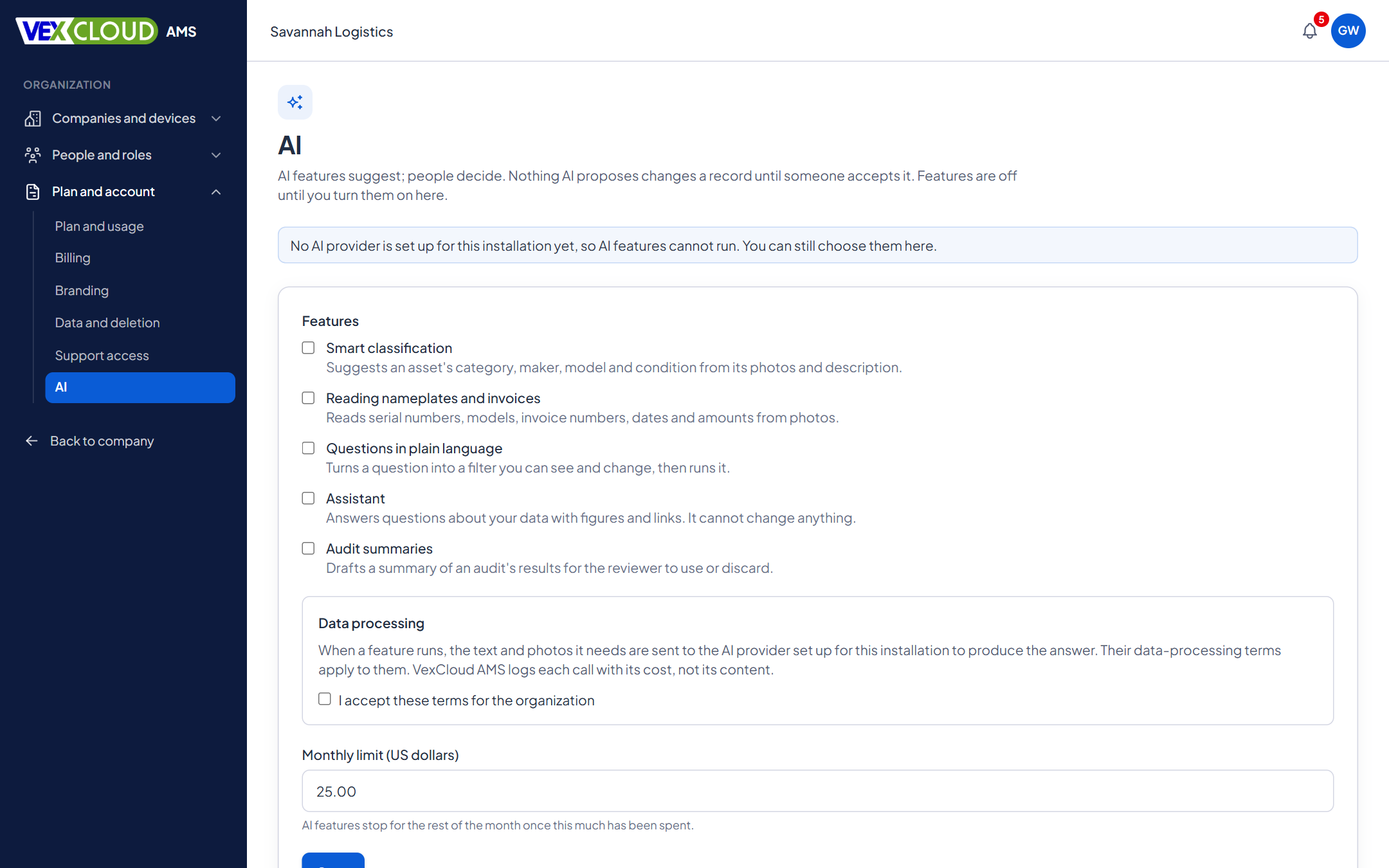
AI in VexCloud AMS does the typing, not the deciding. It suggests values, shows where it got them, and waits for a person to accept. It is off until your organization turns it on.
The problem
Registering an asset means typing a serial number off a plate, picking the right model from a long list, and keying an invoice amount. In a store of two hundred items, that is where the mistakes and the delays come from.
How it works in VexCloud AMS
01
Suggestions, with a reason
Each suggestion names the field, the value, how confident it is, and why. You can accept it as it is, edit it, or reject it. Choices are checked against your own lists, so a category or model that does not exist in your catalogue is never invented.
02
Read nameplates and invoices
Photograph a nameplate or an invoice and VexCloud AMS reads the printed serial number, manufacturer, model, invoice number, date, amount and currency, copying them as they appear. The photo stays beside what was read as evidence.
Amounts and currency are offered only to people who may see and edit financial values.
03
Ask in plain language
Type a question about your register. The answer is not a guess at the numbers: it fills in the asset list's filters, so you can see exactly what was asked, change it, and save it as a view. Anything it could not express is listed rather than quietly dropped.
04
Findings that need no AI
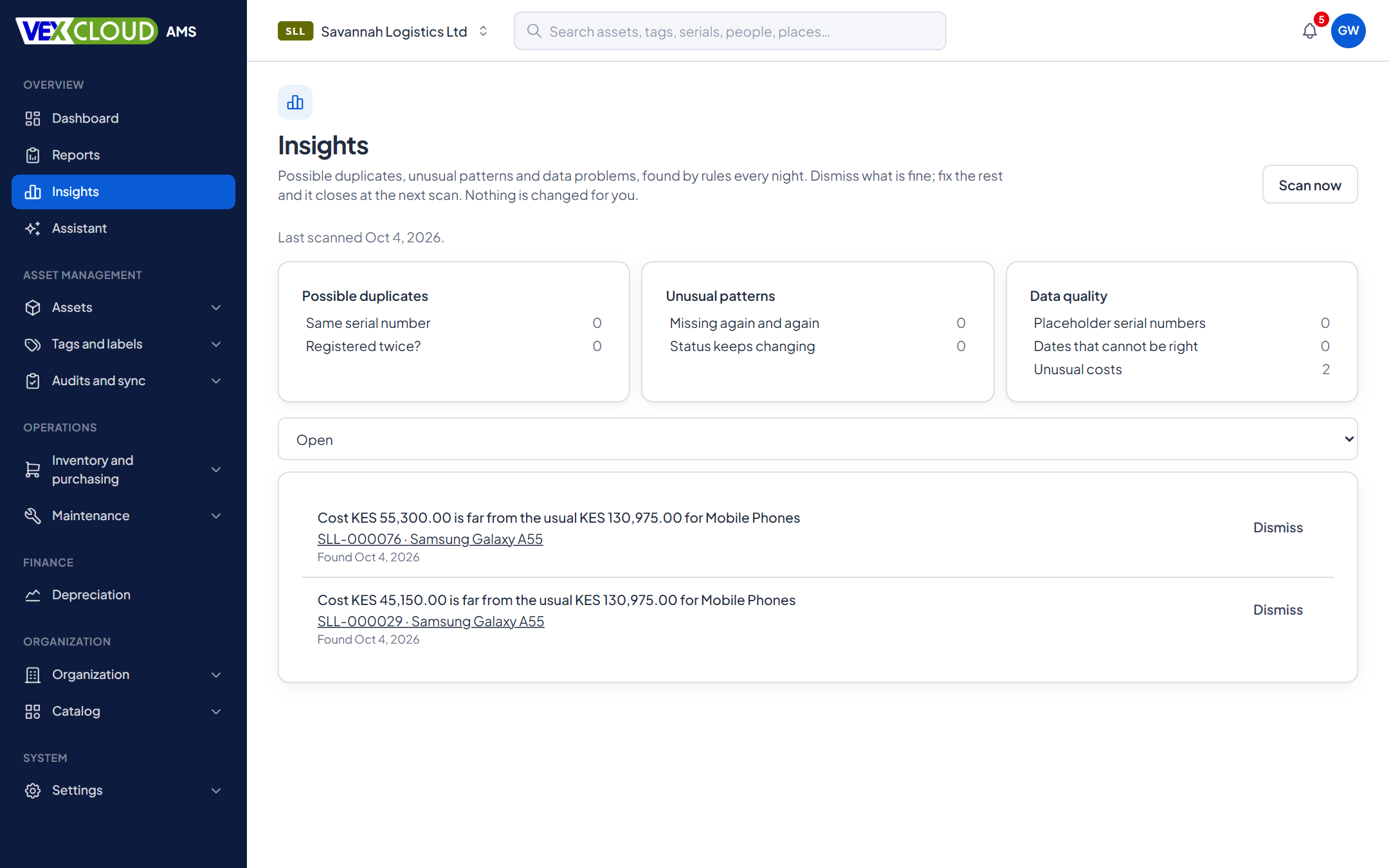
A daily scan looks for possible duplicates (the same serial number on several assets), placeholder serial numbers such as "N/A", impossible dates and costs far from their category's norm. Nothing is merged or changed: people review and dismiss each finding.
05
Control and accountability
- Organization-level switch, with data-processing terms accepted before anything is on.
- A monthly spending limit you set; companies can opt out.
- Per-feature permissions, so you decide who can use it.
- Every call is recorded: who, which feature, how many tokens, what it cost, and a fingerprint of what was exchanged. The content is not kept.
What it does, and what it never does
- ClassifySuggests category, manufacturer, model and condition from a name, description, serial number and photos.
- Read a photoReads the serial number, manufacturer and model from a nameplate, and the invoice number, date and amount from an invoice.
- Ask in plain languageTurns "laptops at HQ with a warranty ending this year" into the asset list's own filters, which you can see and change.
- AssistantAnswers questions by looking things up with your own access, and flags any figure it could not verify.
- Audit summaryDrafts a summary of an audit in review from its figures, for a reviewer to edit and accept.
AI never deletes assets, changes financial records on its own, or finalizes audits. It can only propose, and a person with the right permission decides.
Details
- Principle
- AI suggests; people approve
- Default
- Off until the organization turns it on
- Terms
- Data-processing terms accepted before any feature is on
- Limit
- Monthly spending limit per organization
- Opt-out
- Per company
- Photos
- JPEG, PNG, WebP or GIF, clean uploads only
- Not read yet
- PDFs
- Questions
- Become the asset list's own filters, never database queries
- Financial values
- Suggested and accepted only with financial permissions
- Plan
- Included with ENTERPRISE and ONE-OFF, within a monthly limit your organization sets
Related features
- Fixed asset registerNumbers, serials, locations, custodians, values, photos and documents, with history.
- Import from ExcelMap your columns, catch errors before anything is saved, then import.
- Physical asset auditsScan what is really there and reconcile it against the register while you count.
Manufacturing and logistics: register machinery in the yard by photographing the nameplate.
Plates are easiest to read when assets are tagged consistently. See fixed asset tagging services.
FAQ
Questions on ai assistance
Is AI on by default?
No. It is off until your organization turns it on, accepts the data-processing terms and sets a monthly spending limit. A company in the organization can opt out on its own.
Can AI change my records on its own?
No. AI produces suggestions, and a person accepts or rejects each one. Accepted suggestions are applied with that person's own permissions and recorded as coming from a suggestion. AI does not delete assets, change financial records or finalize audits.
What is sent to the AI provider?
Only what the feature needs: for classification, the asset name, description and serial number, your category and model lists, and up to three photos. Your data is sent under the terms your organization accepted, and the app records each call without keeping the content.
Can I limit what it costs?
Yes. Your organization sets a monthly limit. When it is reached, AI features stop until the next month, and the rest of VexCloud AMS carries on.
Can it read invoices?
It reads photos of nameplates and invoices today. PDFs are not read yet.
See your own assets in VexCloud AMS.
Book a 30-minute demo.