
Depreciation
Depreciation your auditors can reproduce
Set a policy once, calculate every asset for the period, post it to a ledger that cannot be quietly edited, and see book value on every asset. Each figure comes with the inputs that produced it.
The problem
Spreadsheet depreciation works until someone inserts a row, changes a useful life, or opens last year's file. Then the totals no longer agree with the ledger, and nobody can say which formula produced which number.
How it works in VexCloud AMS
01
Policies you define
A policy sets the method, useful life, residual value, how often to charge and when the first charge starts. Residual can be a percentage of cost or a fixed amount. Charge monthly, quarterly or annually, aligned with your fiscal calendar.
- Methods: straight-line, declining balance, double declining balance, sum-of-years'-digits, units of production, none, or a custom formula.
- Conventions for the first period: full month, mid-month, the 15th-day rule, half year, actual days, or next period.
- Rounding to the currency's minor unit, with the final period trued up so the total always equals cost less residual.
02
Run it for the period
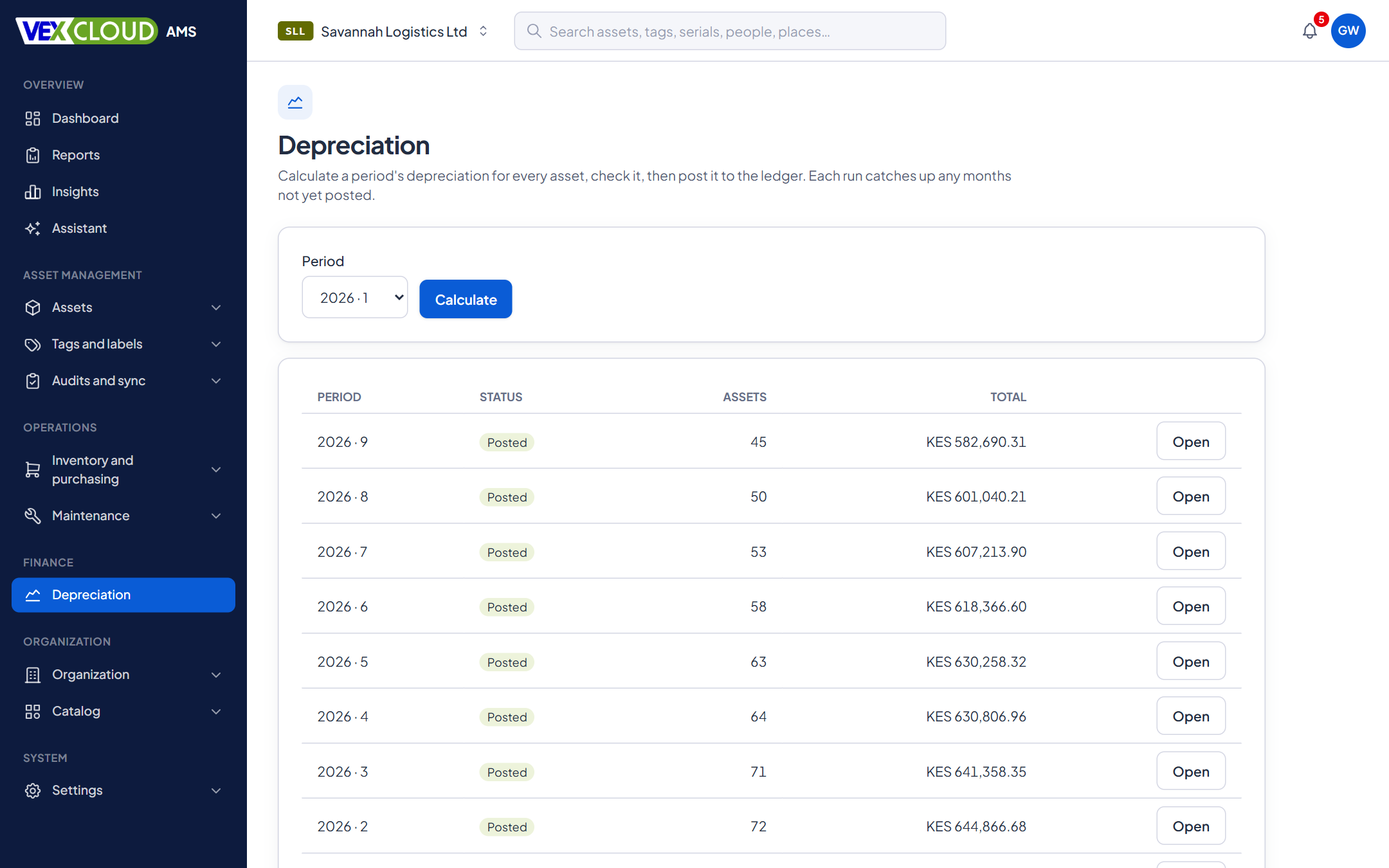
Pick an open period and calculate. VexCloud AMS charges every asset with an active schedule, shows you the run, and waits. Check it, then post it. A run catches up any months that were skipped.
Posted entries are the ledger, and the database refuses changes to them. A mistake is reversed in the open, with negated entries, not edited away. Closing a period stops anything further being posted into it.
03
Book value, always current
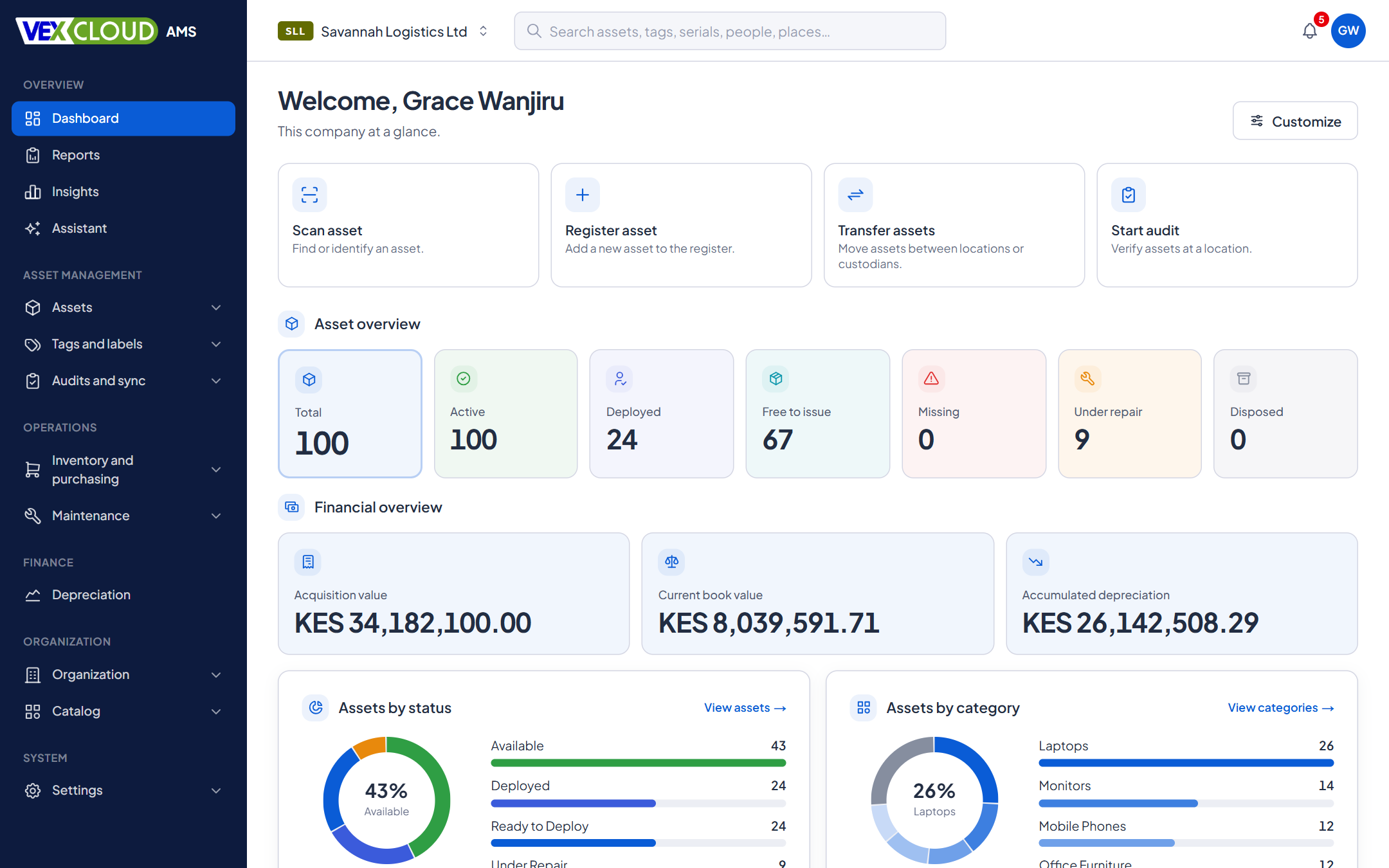
Accumulated depreciation and net book value sit on every asset and are recomputed from the posted entries each time, never incremented by hand. The dashboard rolls them up: acquisition value, current book value and accumulated depreciation in your currency.
The fixed asset register report lists every depreciating asset with cost, additions, impairments, accumulated depreciation and book value, with totals, and exports to CSV.
04
When things change mid-life
Real assets get upgraded, impaired and re-estimated. Record a capitalized addition, an impairment or a change in estimate and the schedule continues from the carrying amount at that point, over the life that remains. Earlier periods are not restated.
Assets already part-depreciated when you start can carry an opening accumulated amount.
05
Try a policy before you use it
The policy simulator runs the rules against a sample cost and start date and shows the whole schedule, with nothing saved. Custom formulas are checked before they are saved, with the position of any error, and can use cost, residual, opening book value, periods remaining and units used.
06
Disposal, with the accounting done
When an asset is disposed of, VexCloud AMS posts the depreciation due to the disposal date, stops the schedule, and works out the result: gain or loss = proceeds − book value − disposal costs. A disposal certificate with its own number is generated as a PDF. A reversed disposal resumes the schedule.
Which policy applies to an asset?
VexCloud AMS looks from the most specific level to the most general and uses the first policy it finds. It decides once, when depreciation starts, and stores the answer on the asset.
1
Asset
An override on one asset
2
Model
The model it was bought as
3
Category
Nearest category with a policy
4
Company default
Fallback for everything else
Why store it? If a category's policy changes next year, last year's assets must not start depreciating differently. Changing what an asset uses is a deliberate step, and it applies from a period you pick.
Details
- Methods
- Straight-line, declining balance, double declining, sum-of-years'-digits, units of production, none, custom formula
- First-period conventions
- Full month, mid-month, 15th-day rule, half year, actual days, next period
- Frequency
- Monthly, quarterly or annual, on your fiscal calendar
- Residual value
- Percentage of cost, fixed amount, or zero
- Policy precedence
- Asset, then model, then category, then company default
- Versions
- Each edit writes a new version; assets keep the one they started with
- Events
- Capitalized additions, impairments, changes in estimate, opening balances
- Ledger
- Calculate, post, reverse, discard; period close
- Reports
- Fixed asset register with totals, disposals, run journals; CSV
- Currency
- Your company's currency
Related features
- Fixed asset registerNumbers, serials, locations, custodians, values, photos and documents, with history.
- Reports and dashboardsThe registers and schedules finance and auditors ask for, exported to Excel and PDF.
- Physical asset auditsScan what is really there and reconcile it against the register while you count.
County governments and state agencies: complete, verified registers for accrual accounting under IPSAS.
Depreciation is only as good as the register under it. See fixing ghost assets under IPSAS accrual guidelines.
FAQ
Questions on depreciation
Which depreciation methods are supported?
Straight-line, declining balance (with an optional switch to straight-line), double declining balance, sum-of-years'-digits, units of production, no depreciation, and custom formulas. VexCloud AMS supports the methods commonly used under IFRS and IPSAS.
If I change a policy, do past figures change?
No. Policies are versioned, and each asset keeps the version it started with. Moving assets to a newer version is a deliberate step that applies from a period you choose, spreading the remaining book value over the remaining life.
Can I load assets that are already part-depreciated?
Yes. When you start depreciation on an existing asset you can give an opening accumulated amount and its date, and the schedule continues from there.
Does it calculate KRA wear-and-tear allowances?
No. VexCloud AMS records book depreciation under the policies you define, and does not compute tax capital allowances, so take those to your tax adviser. A complete, physically verified register is the starting point they need: see why wear-and-tear claims need physical tagging.
Does it connect to my accounting software?
Each depreciation run has a journal you can download as CSV, and the fixed asset register exports with totals. Direct integrations with accounting packages are not available yet.
See your own assets in VexCloud AMS.
Book a 30-minute demo.